Noctua NH-D15
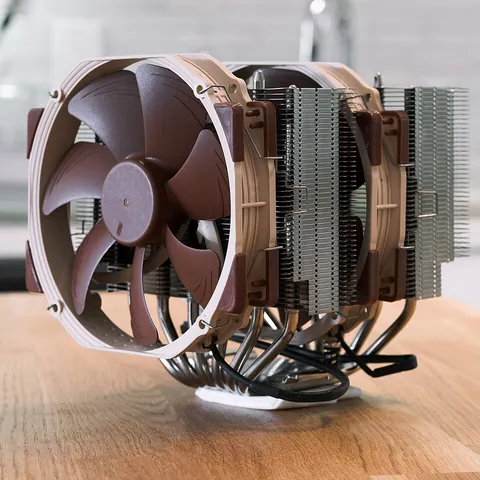
Image credits / Source
File:NH-D15 with classic fans.jpg · Kaleb Kloppe · CC BY 2.0.

Kaleb Kloppe — File:NH-D15 with classic fans.jpg — CC BY 2.0. No endorsement implied.
Wikimedia proportional web thumbnail used as input; Proportionally resized to WebP; metadata removed; no crop or product alteration. Derivative photo remains under CC BY 2.0. Original asset. https://www.flickr.com/photos/74632166@N04/52477402894/

Key source-reported facts
- Cooler type
- air
1 supplied fields. Missing values do not establish compatibility or performance.
Source-reported component specifications. Missing values are not inferred.
Full supplied specifications
| cooler type | air |
|---|
8 specification fields not supplied — inspect the gaps
These fields are unknown in the current source record. They are not zero, absent features or confirmed compatibility.
| power w | Not available |
|---|---|
| height mm | Not available |
| fan size mm | Not available |
| radiator width mm | Not available |
| Supported sockets | Not available |
| manufacturer tdp w | Not available |
| radiator length mm | Not available |
| radiator thickness mm | Not available |
Source and verification
Last verified: 2026-09-28 · Confidence: medium
Verification age: 5 days. Source review is not independent product testing. Report incorrect information.
Explore this product in context
Check mounting before cooling claims
A cooler needs the correct mounting hardware and physical clearance. Socket names, heatsink height and RAM clearance describe different checks; none alone guarantees sustained thermal performance.
Before choosing parts
- Confirm the exact mounting kit and cooler revision for the socket.
- Check fan-adjusted height against case limits and RAM clearance.
- Verify radiator location and thickness if using a liquid cooler.
Plan a build · Check selected parts · Browse platforms and brands